
The Engineer’s Guide to DIY Computer Controlled Holiday Lights
Posted in Projects, Tutorials by Bill
7 Jan 2017

Three years ago, I became a first-time home owner. Beside the overwhelming freedom to hack my new dwelling as I saw fit, I was excited I finally had a canvas with which to paint with crazy holiday lights. You see, I grew up decorating my parent’s house as a kid. I’d use thousands of incandescent (incans) lights to make my parent’s house glow every year. I had to take hiatus when I went to college and through the following 5 years of apartment renting. During that time the ‘light hobby’ exploded with computer control, communities rose and fell and new technologies were created. I’m sad I missed its infancy, but was finally excited to jump in with two feet.
But I hit my first snag. All the information for newcomers was written for non-engineers. IE, the level of “This is a wire, electricity flows in a complete circuit, bla bla bla”. That’s fine for any non-engineer that wants to put blinky blinky on their house like they see on TV, but I’m an electrical engineer. I just wanted to get to the nitty gritty of what technologies I needed to learn, what devices would help me get started, etc. Sadly, I never found a good source of information and instead read over pages and pages of wiki articles and forum posts aimed at the non tech savy. After 2 years and 4 holiday shows I feel I have a good handle on the community now, and I’m writing this for any other tech geeks that want to follow suit. Why now, in January? Because you have to start now to be ready for the holiday season this year. Prepare for a crash course in CLAP. (Christmas Light Addiction Problem)

Tutorial: Vixeno, Vixen Sequence Conversion for Arduino
Posted in Arduino Libraries, Tutorials by Bill
7 Oct 2012
If you haven’t seen videos of those awesome Christmas light shows that sync lights to music then you haven’t ever been on the internet. The software used to create those shows is actually pretty simple to use. Load up a music file, setup number of channels and go to town creating complicated fades, sparkles and other animations with ease. A show or light ‘sequence’ is really just an array of values feed to a controller when played back. I wanted to use a popular (and free!) light show creator called Vixen to create a short light show to be embedded in a project run by an Arduino. This is the script I wrote to do just that so you can too. This tutorial will walk you through using Vixen to create a light show and then how to use my script to embed it in your next micro-controller project. Here’s what I did this it: The Electronic Wedding Wishing Well
Ana’s Perimeter Defense System; Configuring Xbees for Remote IO Reading
Posted in Projects, Tutorials by Bill
15 Dec 2011
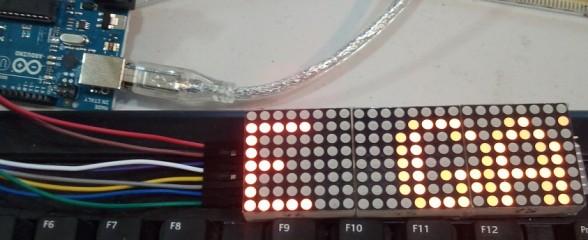
A coworker of mine is soon retiring and moving to South Florida. Her new house has a screened in front porch and side gates for back yard access. The gates can’t be kept locked as the meter readers need access and her front porch is open. She came to me wanting to build a system that would alert her to anyone walking onto her porch or past her side gates and I was more then happy to help. In the process I figured out how to configure Xbees to use API mode and act like remote I/O modules, and have a tutorial to show you how to do it as well.
How to Add Multiple Serial Connections to your Custom Arduino Board or What Those 1k Resistors Do
Posted in Tutorials by Bill
26 Jun 2011

A friend of mine is working on his own custom Arduino powered LCD backpack and asked me to look at his design. I noticed it had a header for the all to familiar FTDI board to program the Arduino and a separate header for power and data connection. Both headers had the ATMega’s UART pins broken out. The problem with this design is it then requires the user to disconnect whatever they have connected to the second set of UART pins whenever they want to attach the FTDI board to upload a new sketch. With a few more passive parts, he could eliminate that need. This is a quick tutorial for beginners looking to roll their own Ardunio boards and may have missed this very easy and time saving design trick.
LED Lighthouse Keeper; DIY Christmas Gift with DIY Retail Packaging
Posted in Projects, Software Libraries, Tutorials by Bill
21 Dec 2010
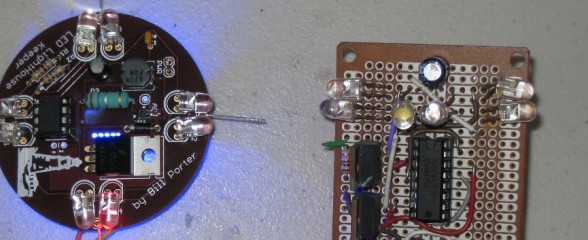
Nothing means more to someone then a gift that took more time to make than money to buy. This is an example of such a gift. Set your way-back-when machines to 2002. Getting ready to finish high school, I had built up some hacker level of electronic knowledge. My parents; both nautical people; have a large lighthouse fountain in their backyard. My mother’s only wish for Christmas that year was for me to build something that would illuminate the lighthouse as if it were a functioning beacon. I obliged, with a circuit consisting of a 555 timer and a 4017 decade counter. It resulted in a simple device that did the job.
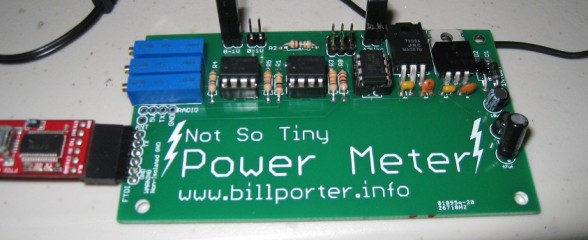
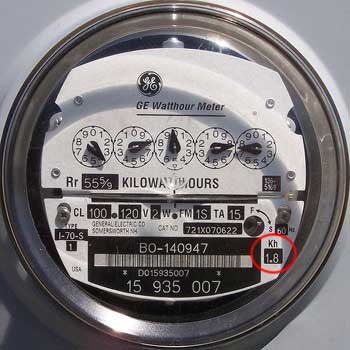 The Kill A Watt is an awesome product; it measures volts, amps and power factor of an individual appliance which can be used to calculate power, cost to run, etc. It’s also quite hackable. But I wanted something that would give me the same data for my whole apartment. After some Googling, the best I could find was this project from picobay, but I didn’t want to invest in an expensive network IO platform. There were also some off-the-shelf solutions, but they too were expensive and limited. Well, time to design my own solution then.
Axon, Webbotlib, Project Designer; An Easy Way To Get Started With It All
Posted in Tutorials by Bill
17 Sep 2010
 Arduino’s are easy, but they have very limited IO and don’t support much hardware off the bat. Great for beginners, but when your ready for the big boy league, the Axon is the way to go. A ton of IO, Uarts and ADC, all in a very small easy to use package. Does your project have a bunch of servos? Building a hexapod? You need the Axon. No shields required.
Ready, Set, Oscillate! The Fastest Way to Change Arduino Pins
Posted in Tutorials by Bill
18 Aug 2010

There are many ways to change an output pin. The way we know and love is the famous digitalWrite() function. (Spoiler: Want a faster digitalWrite? Download Here!)
But even the Arduino Reference claims that it is not the most efficient. The Arduino functions do a lot of error checking to make sure the pin is configured right and has to map Arduino numbering to actual IO ports. All this cost processor cycles, and time. But how much? This article is not to teach you how to useIO registers, you can read about it on the Arduino Port Manipulation page. This is to cover exactly how inefficient the Arduino functions are.
OLD PlayStation 2 Controller Arduino Library
Posted in Software Libraries, Tutorials by Bill
31 May 2010

Outdated. Go to new library HERE
A while ago, I spent countless days trying to interface an Arduino and a Play Station 2 controller. I wanted to build a controller for my SAGAR robot, and figured PS2 + Arduino would be perfect. However, no matter what I did, no existing library would work for me. I shelfed the project for a while, but recently found this forum post with some code by a member named Shutter. I tried out the code, and to my surprise, IT WORKED!!! Well, mostly anyway. It didn’t really have analog stick support, nor was it formatted into an easy to use library.
A person has already come to me asking how to interface an Axon Microcontroller to LabView. Instead of a bland answer to the effect of “It’s nothing special”, I decided to write a quick write-up about communications between computer systems; and I will use the communication between my SAGAR robot and LabView operator panel as an example.