
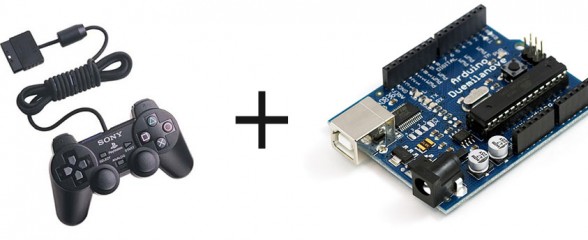
Want to interface a PlayStation 2 Controller with an Arduino Microcontroller? You have come to the right place. Below you will find a link to download an easy to use library that takes care of all the interfacing for you, so you can start using the controller right away for your project. Don’t forget to link your cool projects in the comments, I’d love to see what you do with the library.
First, a brief history:
A while ago, I spent countless days trying to interface an Arduino and a Play Station 2 controller. I wanted to build a controller for my SAGAR robot, and figured PS2 + Arduino would be perfect. However, no matter what I did, no existing library would work for me. I shelfed the project for a while, but recently found this forum post with some code by a member named Shutter. I tried out the code, and to my surprise, IT WORKED!!! Well, mostly anyway. It didn’t really have analog stick support, nor was it formatted into an easy to use library. Well, through need I spent some time adding analog stick support, and formatted it into a library. It works fine on my Arduino Pro mini.
The first fully working version (v1.0) is now available. The big change is you can now define what pins of the Arduino are used, no longer are you tied to pins 10-13. Also, vibration (Rumble) and analog button pressure readings (how hard is a button being pressed) are now working. The library has changed names. PSX -> PS2X to avoid confusion with other sets of code. Sorry for those that need to change a bunch of their programs.
I had to rewrite a lot of code that powers the library, there is not much left of the original code written by Shutter of Arduino forums. There were many bug fixes, now the controller should automatically be in analog mode, and the mode button should be locked. There’s also a catch to make sure not to much time has past since the last controller reading. If there was, it will configure the controller again, in case it timed out.
Source Code available on GitHub project page.
Download PS2X
Old Versions:
Arduino PS2 Controller Library V1.5
Wiring the Controller
The seemingly most notorious part prone to errors is wiring the controller to the Arduino. Lynxmotion sells a nice breakout connector available HERE.
WARNING! WARNING!
The Lynxmotion adapter may not follow the color wiring diagram below. Instead, it might follow this diagram. (Lynxmotion only). Be careful and use a volt meter to confirm pin positions.
Or, to wire the controller not using the Lynxmotion adapter, follow the pinout in the following picture from the amazing CuriousInventor PS2 Interface Guide:
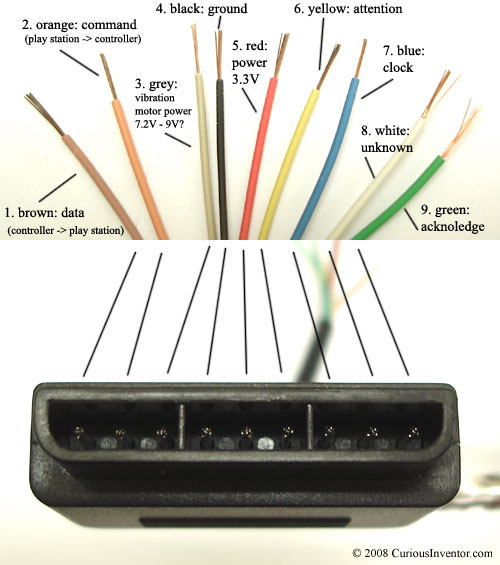
Image Source: CuriousInventor
A note from CuriousInventor: “Red – Power: Many sites label this as 5V, and while this may be true for Play Station 1 controllers, we found several wireless brands that would only work at 3.3V. Every controller tested worked at 3.3V, and the actual voltage measured on a live Playstation talking to a controller was 3.4V. McCubbin says that any official Sony controller should work from 3-5V.”
Here’s a video demonstrating the library.
Guitar Hero Controller Example
The following is a video and source for example of how to use the library with a Guitar Hero Controller.
Source: (tested with v1.5, should work with v1.6 as well)
Guitar Hero Example Arduino Code
Guitar Hero Example Processing Code (thanks Patrick)
Another Demo
Author unknown
Project Showcase
Hey guys, feel free to drop a link off in the comments to your project that uses my library. I’ll post it here.
- Guitar Hero Axe Controlled Flamethrowers by Chris Marion
- Scanalogic Review by CuriousInventor
- SAGAR by Me
- Remote Controlled Robot (Video) by ‘teachengineering‘
- ‘America Dream’ Electric Hammock by Stephen Shaffer
- Life size R2D2 robot by Dan
- Simon Says via DDR mat by Dalpix
Trouble?
Follow my troubleshooting guide first and then visit the Support Forum if you still can’t get it working. Don’t ask for help in the comments below.

This work is licensed under a Creative Commons Attribution-ShareAlike 3.0 Unported License.

If you found this post interesting or helpful, please consider sending in a donation or disabling any ad-block plugin on my site. Proceeds go to my various education outreach efforts, towards repairing museum exhibits, or to my beer fund.


Trackbacks / Pingbacks
458 Comments.
I think I figured out a way to trap the code in a while loop if the analog button is not pushed
I added an integer variable analog, and the code looks for the enablePressures function then if it is not enabled it endlessly cycles looking for that to be pressed before it proceeds with the code.
at least I think it will work. It was working in the debug mode.
heres the code, LMK if I have mangled it!
thanks again. R2 is really coming to life now.
-cris
void loop(){
/* You must Read Gamepad to get new values
Read GamePad and set vibration values
ps2x.read_gamepad(small motor on/off, larger motor strenght from 0-255)
if you don’t enable the rumble, use ps2x.read_gamepad(); with no values
you should call this at least once a second
*/
analog = ps2x.enablePressures(); //check for analog mode and assign value 0 or 1
while (analog == 0){ //if it is not in analog mode do nothing but loop and check for the button
//DEBUG Serial.println(“THE CONTROLLER IS NOT IN ANALOG MODE”);
analog = ps2x.enablePressures();
}
if(error == 1) //skip loop if no controller found
// Serial.println(“error 1 no controller found skipping loop”);
return;
// DEBUG Serial.println(analog);
if(type == 2){ //Guitar Hero Controller
ps2x.read_gamepad(); //read controller
Hi Bill! Thanks for hare this. You have done a awesome work.
I have the library working well. I
Hi Bill! Thanks for share this. You have done an awesome work.
I have the library working well. I’m trying to control the vibrate motors with other buttons, but with no success. What I want is to press start button and the motors rumble, than press select button and the motors stop. How can I make it work?
hi, i have a weird problem with the program, i got this code: >CdH{2;ab`ã`ba”>AfH[Cfaã`c`ba©®0=©|,pi÷8|-¡C2;CfÃ`bab`c`3:fKC”`c`bab`©½jé}©hr’9ý.¢<3|¹-8f|,å
im using arduino duemilanove with atmega 328 and windows xp
if someone could help me thanks
Looks like you have an incorrect baud rate in the serial monitor. The example sketch uses 57600 baud by default.
I have an Arduino Mega 2560 R3.
I’m using a generic ps2 controller. Every button works and I can see the changes in the values and states of the buttons on the serial monitor, But i can’t see any value when i move any of the analogue sticks.
\Can anyone help me?
Hello Bill:
I am new to the world of arduinos. I have an Arduino Mega 2560 R3.
I’m using a generic ps2 controller. Every button works and I can see the changes in the values and states of the buttons on the serial monitor, But i can’t see any value when i move any of the analogue sticks. could you help me?
could you also help me with using the library to set up output pins to control for example motors or leds, etc.
Hey folks,
This has been really helpful! We were hacking on the PS2 and wanted to make an Arduino shield for it, to save ourselves the splicing. It’s on a fundraiser for Tindie now here:
https://tindie.com/shops/DexterIndustries/arduino-playstation-dualshock-shield/
Thanks for the great explanation of everything!
I am getting this in serial monitor after uploading the example sketch. I am using arduino uno.
OUT:IN
1:0 42:0 0:0 0:0 0:0 0:0 0:0 0:0 0:0 0:0 0:0 0:0 0:0 0:0 0:0 0:0 0:0 0:0 0:0 0:0 0:0
OUT:IN
1:0 42:0 0:0 0:0 0:0 0:0 0:0 0:0 0:0 0:0 0:0 0:0 0:0 0:0 0:0 0:0 0:0 0:0 0:0 0:0 0:0
Controller mode not matched or no controller found
Expected 0×41 or 0×73, got 0
No controller found, check wiring, see readme.txt to enable debug. visit http://www.billporter.info for troubleshooting tips
Unknown Controller type
I have what I believe to be early model Sony controllers, and the wire coloring scheme was a little different than what is posted here. I got:
1 brown data
2 orange command
3 purple vibration motors (5v)
4 blk\grey ground
5 red power (5v)
6 yellow attention
7 blue clock
8
9 green acknowladge
It wasn’t different enough to affect it for this tutorial, but it was worth noting. Some other notes:
- I needed a pullup resistor between VCC and pin 1 (data) for it to work
- The controller wouldn’t sync up at 3.3V, but it runs at 5V. I used a 20k pullup resistor, but I don’t think this should cause the discrepancy.
- I tried using an external power supply for the controller (and using the arduino for data), but things got all funky when I tried that. I’m assuming if I used the external voltage reference on the arudino it would work, but I haven’t tried that.
I have what I believe to be early model Sony controllers, and the wire coloring scheme was a little different than what is posted here. I got:
1 brown data
2 orange command
3 purple vibration motors (5v)
4 blk\grey ground
5 red power (5v)
6 yellow attention
7 blue clock
8
9 green acknowladge
It wasn’t different enough to affect it for this tutorial, but it was worth noting. Some other notes:
- I needed a pullup resistor between VCC and pin 1 (data) for it to work
- The controller wouldn’t sync up at 3.3V, but it – I tried using an external power supply for the controller (and using the arduino for data), but things got all funky when I tried that. I’m assuming if I used the external voltage reference on the arudino it would work, but I haven’t tried that. runs at 5V. I used a 20k pullup resistor, but I don’t think this should cause the discrepancy.
[...] entrepris la communication entre le tapis et la carte arduino. Pour cela nous avons utilisé une librairie déjà existante pour les controleur PS2. Néanmoins, nous avons du adapter celle-ci à nos besoins car elle ne [...]
Can you please tell me which pins to plug in.
I am using arduino mega 2560 R3. Would be of great help if you could tell me the type of pins they are for example PWM ANALOGUE etc.
I have successfully used a generic PS controller but for some reason the genuine sony ps controller does not function.
The pins for generic controller:
clock = 52
attention = 3
command = 2
data = A0
It worked perfectly on generic.
There are some buttons which is very fast n responding….when press it ones it automatically is pressed twice….(intending to turn the led on- but the led turns on and then off again- very fast that is)
Please if anyone could help me out….i would be really thankful
Follow the tyroubleshooting guide to get the other controller to work. As far as the pressing twice, you need to implement your own switch debouncing.
I am getting this in serial monitor after uploading the example sketch. I am using an Arduino Mega 2560, w/MadCatz wireless PS2:
OUT:IN
1:0 42:0 0:0 0:0 0:F8 0:FF 0:FF 0:FF 0:FF 0:0 0:0 0:0 0:0 0:0 0:0 0:0 0:0 0:0 0:0 0:0 0:0
OUT:IN
1:FF 42:FF 0:FF 0:FF 0:FF 0:FF 0:FF 0:FF 0:FF 0:0 0:0 0:0 0:0 0:0 0:0 0:0 0:0 0:0 0:0 0:0 0:0
Controller mode not matched or no controller found
Expected 0×41 or 0×73, got FF
No controller found, check wiring, see readme.txt to enable debug. visit http://www.billporter.info for troubleshooting tips
Unknown Controller type
Have you followed the instructions in the troubleshooting guide?