
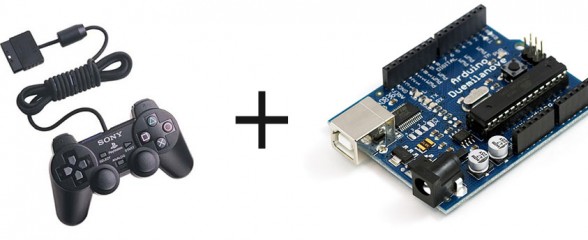
Want to interface a PlayStation 2 Controller with an Arduino Microcontroller? You have come to the right place. Below you will find a link to download an easy to use library that takes care of all the interfacing for you, so you can start using the controller right away for your project. Don’t forget to link your cool projects in the comments, I’d love to see what you do with the library.
First, a brief history:
A while ago, I spent countless days trying to interface an Arduino and a Play Station 2 controller. I wanted to build a controller for my SAGAR robot, and figured PS2 + Arduino would be perfect. However, no matter what I did, no existing library would work for me. I shelfed the project for a while, but recently found this forum post with some code by a member named Shutter. I tried out the code, and to my surprise, IT WORKED!!! Well, mostly anyway. It didn’t really have analog stick support, nor was it formatted into an easy to use library. Well, through need I spent some time adding analog stick support, and formatted it into a library. It works fine on my Arduino Pro mini.
The first fully working version (v1.0) is now available. The big change is you can now define what pins of the Arduino are used, no longer are you tied to pins 10-13. Also, vibration (Rumble) and analog button pressure readings (how hard is a button being pressed) are now working. The library has changed names. PSX -> PS2X to avoid confusion with other sets of code. Sorry for those that need to change a bunch of their programs.
I had to rewrite a lot of code that powers the library, there is not much left of the original code written by Shutter of Arduino forums. There were many bug fixes, now the controller should automatically be in analog mode, and the mode button should be locked. There’s also a catch to make sure not to much time has past since the last controller reading. If there was, it will configure the controller again, in case it timed out.
Source Code available on GitHub project page.
Download PS2X
Old Versions:
Arduino PS2 Controller Library V1.5
Wiring the Controller
The seemingly most notorious part prone to errors is wiring the controller to the Arduino. Lynxmotion sells a nice breakout connector available HERE.
WARNING! WARNING!
The Lynxmotion adapter may not follow the color wiring diagram below. Instead, it might follow this diagram. (Lynxmotion only). Be careful and use a volt meter to confirm pin positions.

Or, to wire the controller not using the Lynxmotion adapter, follow the pinout in the following picture from the amazing CuriousInventor PS2 Interface Guide:
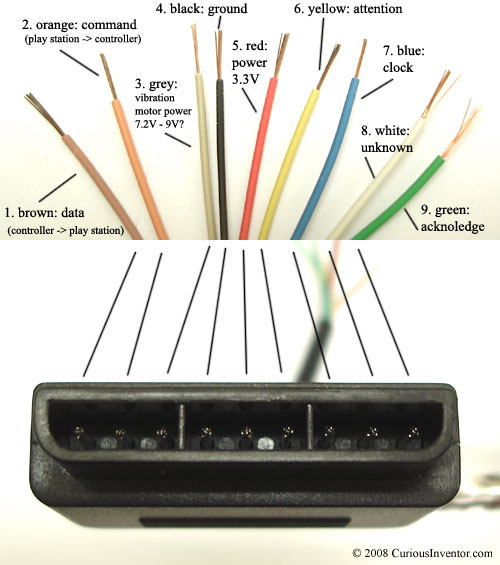 Image Source: CuriousInventor
A note from CuriousInventor: “Red – Power: Many sites label this as 5V, and while this may be true for Play Station 1 controllers, we found several wireless brands that would only work at 3.3V. Every controller tested worked at 3.3V, and the actual voltage measured on a live Playstation talking to a controller was 3.4V. McCubbin says that any official Sony controller should work from 3-5V.”
Here’s a video demonstrating the library.
Guitar Hero Controller Example
The following is a video and source for example of how to use the library with a Guitar Hero Controller.
Source: (tested with v1.5, should work with v1.6 as well)
Guitar Hero Example Arduino Code
Guitar Hero Example Processing Code (thanks Patrick)
Another Demo
Author unknown
Project Showcase
Hey guys, feel free to drop a link off in the comments to your project that uses my library. I’ll post it here.
- Guitar Hero Axe Controlled Flamethrowers by Chris Marion
- Scanalogic Review by CuriousInventor
- SAGAR by Me
- Remote Controlled Robot (Video) by ‘teachengineering‘
- ‘America Dream’ Electric Hammock by Stephen Shaffer
- Life size R2D2 robot by Dan
- Simon Says via DDR mat by Dalpix
Trouble?
Follow my troubleshooting guide first and then visit the Support Forum if you still can’t get it working. Don’t ask for help in the comments below.

This work is licensed under a Creative Commons Attribution-ShareAlike 3.0 Unported License.
