
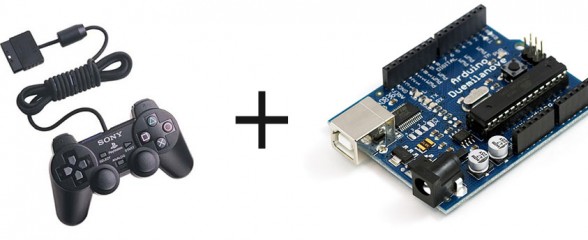
PlayStation 2 Controller Arduino Library v1.0

Posted in Arduino Libraries by Bill
5 Jun 2010
PlayStation 2 Controller Arduino Library v1.0

Want to interface a PlayStation 2 Controller with an Arduino Microcontroller? You have come to the right place. Below you will find a link to download an easy to use library that takes care of all the interfacing for you, so you can start using the controller right away for your project. Don’t forget to link your cool projects in the comments, I’d love to see what you do with the library.

First, a brief history:

A while ago, I spent countless days trying to interface an Arduino and a Play Station 2 controller. I wanted to build a controller for my SAGAR robot, and figured PS2 + Arduino would be perfect. However, no matter what I did, no existing library would work for me. I shelfed the project for a while, but recently found this forum post with some code by a member named Shutter. I tried out the code, and to my surprise, IT WORKED!!! Well, mostly anyway. It didn’t really have analog stick support, nor was it formatted into an easy to use library. Well, through need I spent some time adding analog stick support, and formatted it into a library. It works fine on my Arduino Pro mini.

The first fully working version (v1.0) is now available. The big change is you can now define what pins of the Arduino are used, no longer are you tied to pins 10-13. Also, vibration (Rumble) and analog button pressure readings (how hard is a button being pressed) are now working. The library has changed names. PSX -> PS2X to avoid confusion with other sets of code. Sorry for those that need to change a bunch of their programs.

I had to rewrite a lot of code that powers the library, there is not much left of the original code written by Shutter of Arduino forums. There were many bug fixes, now the controller should automatically be in analog mode, and the mode button should be locked. There’s also a catch to make sure not to much time has past since the last controller reading. If there was, it will configure the controller again, in case it timed out.

Source Code available on GitHub project page.


Download PS2X


Old Versions:

PS2X_lib_v1.0

PS2X lib v1.41

Arduino PS2 Controller Library V1.5

Wiring the Controller

The seemingly most notorious part prone to errors is wiring the controller to the Arduino. Lynxmotion sells a nice breakout connector available HERE.

WARNING! WARNING!

The Lynxmotion adapter may not follow the color wiring diagram below. Instead, it might follow this diagram. (Lynxmotion only). Be careful and use a volt meter to confirm pin positions.

Or, to wire the controller not using the Lynxmotion adapter, follow the pinout in the following picture from the amazing CuriousInventor PS2 Interface Guide:
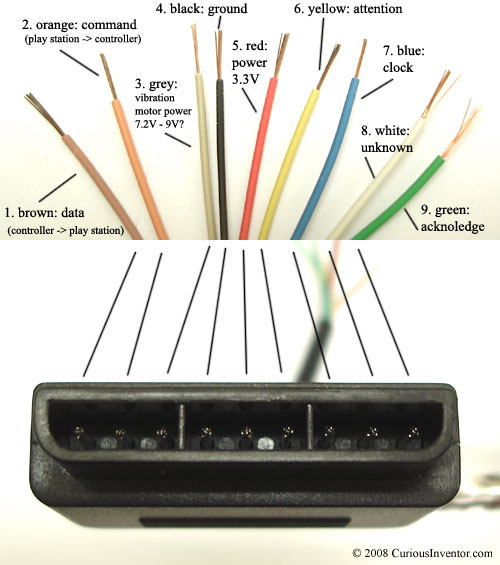
Image Source: CuriousInventor

A note from CuriousInventor: “Red – Power: Many sites label this as 5V, and while this may be true for Play Station 1 controllers, we found several wireless brands that would only work at 3.3V. Every controller tested worked at 3.3V, and the actual voltage measured on a live Playstation talking to a controller was 3.4V. McCubbin says that any official Sony controller should work from 3-5V.”

Here’s a video demonstrating the library.

Guitar Hero Controller Example

The following is a video and source for example of how to use the library with a Guitar Hero Controller.

Source: (tested with v1.5, should work with v1.6 as well)

Guitar Hero Example Arduino Code

Guitar Hero Example Processing Code (thanks Patrick)

Another Demo

Author unknown

Project Showcase

Hey guys, feel free to drop a link off in the comments to your project that uses my library. I’ll post it here.

  1. Guitar Hero Axe Controlled Flamethrowers by Chris Marion
  2. Scanalogic Review by CuriousInventor
  3. SAGAR by Me
  4. Remote Controlled Robot (Video) by ‘teachengineering
  5. ‘America Dream’  Electric Hammock by Stephen Shaffer
  6. Life size R2D2 robot by Dan
  7. Simon Says via DDR mat by Dalpix

Trouble?

Follow my troubleshooting guide first and then drop me a comment if you still can’t get it working.
Creative Commons License
This work is licensed under a Creative Commons Attribution-ShareAlike 3.0 Unported License.


If you found this post interesting or helpful, please consider sending in a donation or disabling any ad-block plugin on my site. Proceeds go to my various education outreach efforts, towards repairing museum exhibits, or to my beer fund.


Share

Trackbacks / Pingbacks

  1. HDSPs and Playstation 2 controllers on Arduinos - Hack a Day
  2. How to create a PS2 PCB?
  3. Flaming guitar hero - Hack a Day
  4. Color Fire Hero Preview « The Mind of Bill Porter
  5. Arduino Blog » Blog Archive » FireHero To Warm You Up In Winter
  6. Arduino Playstation 2 Controller Library Troubleshooting Guide « The Mind of Bill Porter
  7. DIY Arduino Intervalometer : DIYfilm
  8. Early Development | hypermediacreator
  9. EasyTransfer Arduino Library « The Mind of Bill Porter
  10. Tesla Hero, An Awesome Million Volt Guitar « The Mind of Bill Porter
  11. Tesla Hero « adafruit industries blog
  12. George the Animatronic Puppet « adafruit industries blog
  13. Documentation, and future projects | Mecharobotics's Blog
  14. PS2 controller working! | Mecharobotics's Blog
  15. PS2 Controller Buttons sent over RFM12 wireless module | Mecharobotics's Blog
  16. dome drive and control | kimncris R2D2 Build
  17. Some fun with servos and a playstation gamepad | Xorsat
  18. Weekend Project: Arduino + Xbee + PS2 controller = 20 channel universal project controller! « adafruit industries blog
  1. 371 Comments.

    • Ben SumnerNo Gravatar says:

      Hi, I am still very new to arduino, but I am wanting to do what this library allows.. but in reverse.

      I need to send signals TO the PS2 (actually PS1) using arduino. Is there a way to do this with your library? I am attempting to create something that will eventually allow controlling a game in a similar fashion to an autonomous robot.

      However I am stuck on how to SEND a key command rather than read.

      • BillNo Gravatar says:

        Striker is correct, this library won’t help you. But many people have already done what you are looking for. There was one project that would play guitar hero automatically. Google should find it for you.

    • Striker121No Gravatar says:

      While I can’t say for sure, I’m pretty certain this library can’t emulate PS2 controller signals, only read them and emulate the few console signals to initialize the controller, you’d need something else for emulating the controller itself. (I’m sure it can be done, but it’d take some effort)

    • danfNo Gravatar says:

      Bill, can your libraries be made to work with arduino 1.0? I love both this and the easy transfer.

    • StarkRGNo Gravatar says:

      Was anyone able to confirm that there’s a difference in precision between Sony brand controllers and generic ones?

      • BillNo Gravatar says:

        Stark,

        I’ve only ever used Sony. Maybe someone else who’s used of brands will comment.

        • StarkRGNo Gravatar says:

          Hi Bill, using sony do you get full prescision (ie 0,1,2,3,4,5,…,20,21,22,…)? I’ve seen reports that non sony brands are less precise (0,2,4,6… or even 0,10,20,30,…). For my purposes I want to get the best prescision possible, if that means spending twice as much then so be it, however if the prescision isn’t any better then I don’t want to spend that much. So some example output would be helpful in deciding which controller to buy.

          Thanks so much for your work on this project.

          • BillNo Gravatar says:

            Stark,

            I’d have to dig out my stuff to capture some data and I won’t have time to do that for a week or so. I do remember my data seemed relatively precise, but the output was not linear to the stick position and there was a decent amount of noise and drift at the center. If you need REAL precision, a game controller may not be the way to go.

            • StarkRGNo Gravatar says:

              Thanks for the update. That sounds more like accuracy issues than precision. Accuracy means getting a similar measurement for the same state (measuring an object twice and getting the same result), precision is using millimeters instead of centimeters. What that looks like in this case is accuracy would be getting consistent values for a given joystick position and precision would be smaller spaces between returned values.
              For my needs precision is more important than accuracy.

          • IdiNo Gravatar says:

            Hi Stark, I use other brand one and value is (0,10,20,35,….) go for sony is much better

    • AlexNo Gravatar says:

      Hello, I tried your PS2X example sketch + library (v1.8) on a Arduino Uno together with a Sony PS2 Dualshock2 Controller. Using the unmodified library I get the following result:

      OUT:IN
      1:FF 42:63 0:10 0:FE 0:FF 0:78 0:43 0:40 0:0 0:0 0:0 0:0 0:0 0:0 0:0 0:0 0:0 0:0 0:0 0:0 0:0
      OUT:IN
      1:FF 42:63 0:10 0:FE 0:FF 0:78 0:43 0:40 0:0 0:0 0:0 0:0 0:0 0:0 0:0 0:0 0:0 0:0 0:0 0:0 0:0
      Controller mode not matched or no controller found
      Expected 0×41 or 0×73, got 63
      No controller found, check wiring, see readme.txt to enable debug. visit http://www.billporter.info for troubleshooting tips
      Unknown Controller type

      If I change the line

      if(PS2data[1] != 0×41 && PS2data[1] != 0×73 && PS2data[1] != 0×79){ //see if mode came back. If still anything but 41, 73 or 79, then it’s not talking

      to

      if(PS2data[1] != 0×41 && PS2data[1] != 0×73 && PS2data[1] != 0×79 && PS2data[1] != 0×63){ //see if mode came back. If still anything but 41, 73 or 79, then it’s not talking

      And switching to Analog Mode on the PS2 Controller (by pressing Analog button once -> red LED is now on) I get the following result:

      OUT:IN
      1:FF 42:71 0:18 0:FE 0:FF 0:78 0:4A 0:40 0:0 0:0 0:0 0:0 0:0 0:0 0:0 0:0 0:0 0:0 0:0 0:0 0:0
      Controller not accepting commands
      mode stil set at71
      Controller found but not accepting commands. see readme.txt to enable debug. Visit http://www.billporter.info for troubleshooting tips
      Unknown Controller type

      Its now possible to read the value of certain buttons, but the displayed button is rarely coresponding to the button pressed. It would be very kind if u can take a look at this problem.

      Best regards, Alex

    • alessandroNo Gravatar says:

      Hello Bill! I’m in trouble with the coding and use the library … my intention is to build a robot rover type your …. could you pass your scketch?
      1000 thanks!!

    • [...] and make a little prototype out of it, using a PS2 controller.  I was looking at this guide and this one so it seems that it is pretty doable, but since it uses the SPI bus, it might cause problems when I [...]

    • J Eduard DickelNo Gravatar says:

      The analog sticks doesn’t work. What’s wrong?

    • alessandroNo Gravatar says:

      I used your guide.
      my problem and command a rover like yours is why I asked if she could give me your schedule for testing.
      thanks

    • eissaNo Gravatar says:

      oke i would like to thank you for your ps2 library

      and i would like to question you about something

      the controller input must be pwm ??

      all of them ??

      or ??

      thanks in advance

    • [...] wasn’t too hard to setup either, I just followed Bill Porter’s guide, as well as this post, which explicitly stated which wires went where.  This seems like it would [...]

    • [...] the PS2 controller with the RFM12 modules, since they both use SPI.  But the great thing is that Bill Porter wrote the PS2X library so that the pins are changable, aka software SPI.  So the RFM12B can use [...]

    • RuaridhNo Gravatar says:

      I am looking into using a PS2 controller on an arduino project but I just cant understand this at all, how does the controller wire into the arduino board and what sketch should I use to get results from it?

      I cant see any schematics at all. please help!

    • susiloharjoNo Gravatar says:

      Hai Bill I’m From Indonesia, i really like this post because i want to make it too, but i have a problem my joystick had error massage for check wiring, i already see n attach wire like your image, and still not works too my arduino is dfrobot arduino mega 1280 any sugestion? help me pls

    • susiloharjoNo Gravatar says:

      I do Bill, but still nothing happen, did you ever try to dfrduino mega r another arduino Mega? any trick r another quote for running this library on my board,

      Do you have tutorial for make sure that’s gamepad support your library

      or i must buy converter gamepad to USB and attaching them on USB Shield :(

      • BillNo Gravatar says:

        Every suggestion I have is in that troubleshooting guide. If you are still having problems after trying all those steps, there’s not much else I can do. It may be bad hardware or bad connections.

Leave a Reply

Your email address will not be published. Required fields are marked *

*

Notify me of followup comments via e-mail. You can also subscribe without commenting.